LanguageBreak

LanguageBreak is jailbreak utilising a novel langpicker-nativebridge exploit.
Prerequisites
- Please check that your Kindle is compatible with LanguageBreak
- You will also need a PC
LanguageBreak will NOT work on firmwares newer than
5.16.2.1.1
Jailbreaking Your Kindle
Downloading prerequisites
- Download LanguageBreak from here
- Extract the
tar.gzfile to somewhere safe on your computer
Entering demo mode
Initial setup
- Factory reset your Kindle
- On the language selection screen, select any language
- Skip Wi-Fi registration by selecting any network and then backing out
- Type
;enter_demointo the Kindle’s searchbar an click enter - Reboot the Kindle by holding down the button and selecting the
rebootoption when it appears - The device should now boot into demo mode, if it doesn’t, check the Troubleshooting section
- Skip Wi-Fi setup and enter fake information when prompted
- Skip searching for a demo payload
- Select the
standarddemo type - Press
Doneat the “sideload content” prompt - Once that is done, you can byass the
misconfigurationerror using the following gesture: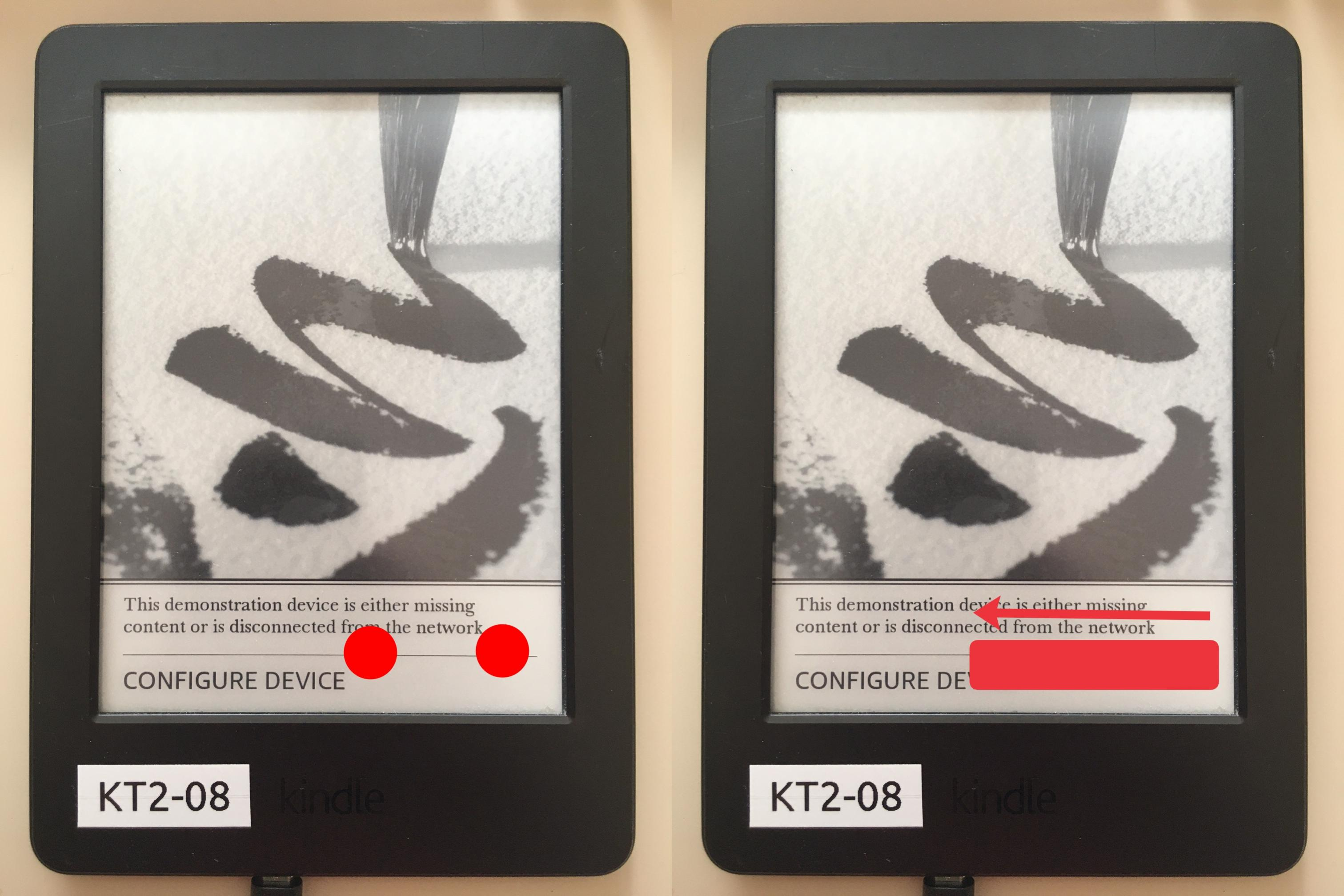 (tap with two fingers, then swipe left)
 - In the searchbar, type
;demoand click enter - Select the “sideload content” option
Sideloading the content
- Connect the Kindle to your PC
- Copy the contents of the LanguageBreak folder to the Kindle - merging and replacing all files
- Eject and Unplug your kindle and go back to the demo menu
- Select the “Resell Device” option
- Choose
Yes/Resell - Now wait for the
press power buttonmessage to show - As soon as it appears plug your kindle back to your computer and copy the contents of the LanguageBreak folder into it once again, overwrite files then safely eject
- Hold the power button as instructed on screen
- You should be in a language selection menu in a few seconds
- Choose Chinese (The second-last one on the
rightlist, abovep s e u d o t) - Your kindle should reboot and you should see some log message on the screen
- The device is now in a jailbroken state
Install LanguageBreak-Specific Hotfix
LanguageBreak is unique in the sense that its own
Hotfixmust be installed before proceeding with otherPost Jailbreakitems
- Type
;uzbinto the search bar of your Kindle and click enter - Connect the Kindle to your PC
- Copy the
update_hotfix_languagebreak.binfrom the LanguageBreaktar.gzyou extracted during setup to the root of your Kindle - Eject and unplug the Kindle
- Enter
;dstsinto the search bar of the Kindle and click enter - Select
Update Your Kindle
You are now ready to check the Post Jailbreak section for what to do now.
Troubleshooting
If you had any issue with the above steps…
Alternative Demo Mode entry method
- Plug the Kindle into your PC
- Create an empty file named
DONT_CHECK_BATTERYat the root of your Kindle - Activate demo mode by typing
;demointo the search bar and clicking enter - Continue from
step 5ofInitial setup
Resetting whilst in Demo Mode
If you need to reset your device whilst in demo mode
- Enter
;uzbin the search bar and click enter - Plug the Kindle into your PC
- Create an empty file at the root of the Kindle called
DO_FACTORY_RESTORE - Reboot the Kindle
Secret Gesture Video
this video shows how to perform the misconfiguration bypass gesture
Credits
- LanguageBreak created by Marek
- Original
langpicker-nativebridgeexploit discovered by GeorgeYellow and bulltricks